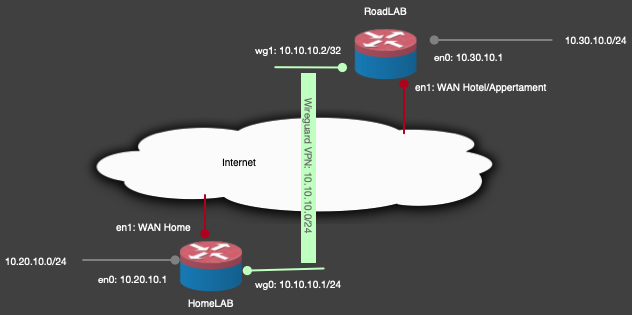
A couple of years ago I created a IPSec tunnel betweem my RoadLAB and HomeLAB so I could access my home network and use my home as a my breakout online. In effect I was home. However it turned out to be a fragile setup. More often then not did it not really work. I never got the traffic from my Apple TV to go really go through the tunnel. We want to use the Delta TV Apple TV app also from our remote location. Using the iPad app works, when using the tvOS app, it complains that it needs to be on the Delta network. Annoying and this has to be solvable.
Solution attempt 1
Since I am using Twingate to connect to my HomeLAB, why not see if it is possible to connect the two (RoadLAB & HomeLAB)
It might be possible, but the the connection is not really stable. Although I was able to connect to webservices through this Twingate connection, streaming was simply not possible using the site-site solution. Using the Twingate client does support streaming, but alas there is no Apple TV client for the Twingate solution. Also I only would be able to connect to the HomeLAB network. I still would need to route my traffic from the Apple TV back home and then out to the internet.
Back to “classic” VPN solutions. At least then I have a point-point connection. And I might be able to route the traffic as desired.
VPN
For me I rather not use the IPSec tunnel or the OpenVPN solution. In most locations my RoadLAB does not have a public IP address, but are we using a NAT solution. So in effect I am doing a double NAT. Workable if you do not need access from outside. And even if I need to access the RoadLAB LAN, I can use Twingate for that. Since in the past I did setup WireGuard Road Warrior a couple of times, the ease I could get it to work made me wonder if it is possible using WireGuard to create a site-site tunnel and do the breakout online at my home location.
Solution attempt 2
Finally I got it working. Using a nifty combination of three how-to’s of the OPNSense Documentation:
Implementation
I figured out a way to combine (elements) of these three how-to’s. In my opinion this should work. At the same time it is a nice challenge!
Road Warrior
First I got the basic road warrior setup working. Testing it from my iPad and now I have the posibility to connect to my home using WireGuard. I am able to connect to the home network and back out online if I need to. Next step is a bit harder.
Proton Road Warrior VPN
Since I also have a Proton account, why nog try to implement this as well. Following the how-to work as expected. I am now able to selectivly send data through the Proton VPN, using the OPNSense gateway as a routing service. Pretty cool. Seeing this approach in action, I should be able to get to my end-goal.
Connecting the RoadLAB gateway to HomeLAB
Following the same rythem as in the Proton Road Warrior VPN I used the credentials to create the connection. And pretty fast it worked. I did ran into some stupid mistake I made. When setting the UDP port on my Home OPNSense gateway it really helps to use the excact same digits for the port. Stupid me, switched two digits…. The most annoying part in troubleshooting this that even when you use the wrong port. The WireGuard client say connected, while it clearly cannot, since that port is not actually connected…
But in the end found the issue and now it really works. Now there is a connection to my HomeLAB network.
Selective Routing
Using the last How-To and a static lease for the Apple TV I got it working, All traffic from my Apple TV is now routed through the WireGuard connection to my HomeLAB and back out. I can stream my content from my JellyFin instance and the Delta app also works. I am accessing the Delta TV content through the sits-site tunnel and then via the Delta network. After some testing whith just this device I made sure to route all traffic of the RoadLAB LAN through the WireGuard VPN. And presto it works as I wanted. This is a pretty cool solution.
Performance
Although IPSec tunnels are the fastest type, they are the most complex to setup and maintain. The speed decrease is hardly there. I still get reasonable download speeds on the remote side that is pretty close to the maximum speed available. So not really a problem. All streaming services work. Pretty cool solution. For sure a next level connection between my two OPNSense gateways.